Short answer
Apple Cash vs Venmo comes down to who you pay. Apple Cash charges 1.7% to cash out instantly and Venmo 1.75%, both with a $0.25 minimum and a $25 cap, and standard bank transfers are free on both. Apple Cash only works when both people use it on Apple devices. Venmo is not tied to Apple hardware and offers Purchase Protection on payments tagged as purchases.
On this page
At a glance
- Instant cash-out feeApple Cash 1.7%, Venmo 1.75%, each $0.25 minimum and $25 maximum
- Instant goes toApple Cash an eligible debit card; Venmo an eligible bank account or debit card
- Standard bank transferfree on both, usually 1 to 3 business days
- Sending limitApple Cash $10,000 per message and per 7 days; Venmo $60,000 a week once verified, $299.99 before
- Credit card as fundingApple Cash no (balance or debit card); Venmo yes, with a 3% fee
Sources: Apple Cash transfer limits, Venmo fees · Checked on November 13, 2026
What each instant cash-out costs
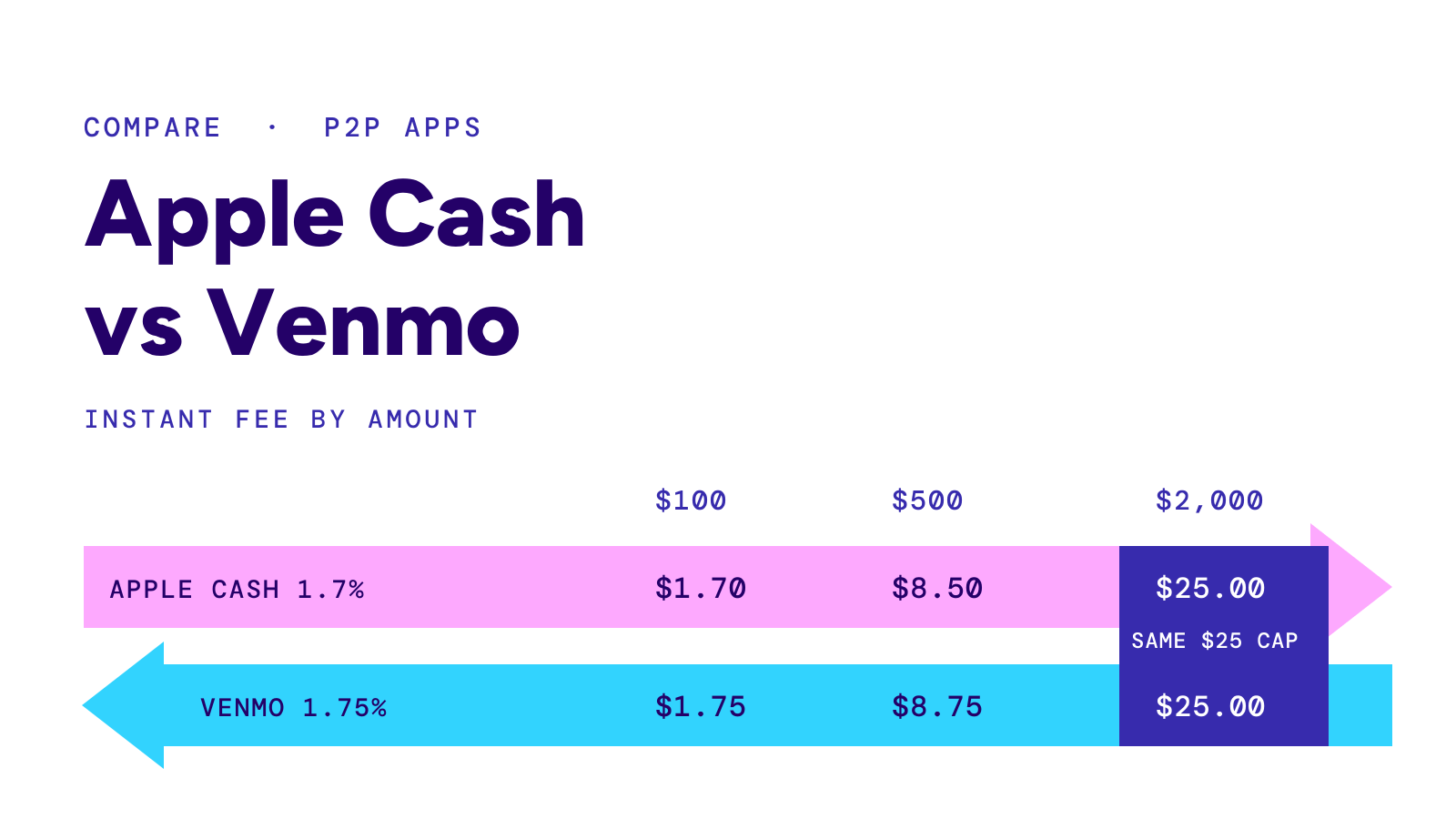
The two percentages look almost identical, and on most amounts the gap is a quarter or less. The table runs both formulas on the amounts people usually move. Both apps take the fee out of the transfer, so you receive the amount minus the fee.
| You cash out | Apple Cash fee (1.7%) | Venmo fee (1.75%) | Difference |
|---|---|---|---|
| $10 | $0.25 (minimum) | $0.25 (minimum) | $0.00 |
| $100 | $1.70 | $1.75 | $0.05 |
| $500 | $8.50 | $8.75 | $0.25 |
| $1,000 | $17.00 | $17.50 | $0.50 |
| $1,450 | $24.65 | $25.00 (cap) | $0.35 |
| $2,000 | $25.00 (cap) | $25.00 (cap) | $0.00 |
Source: Apple Cash transfer limits, Venmo Instant Bank Transfer FAQ · Checked on November 13, 2026
The minimum fee applies below about $14.71 on Apple Cash and $14.29 on Venmo. The $25 cap starts at about $1,470.59 on Apple Cash and $1,428.57 on Venmo. Above roughly $1,471 the instant fee is the same $25 on both.
The real difference is where the money can go instantly. Apple Cash sends an Instant Transfer only to an eligible debit card in the Wallet app; a bank account gets the free 1 to 3 business day option. Venmo can send an instant transfer to an eligible US bank account or a Visa, Mastercard or Discover debit card that takes part in instant transfer services. If your bank card is not eligible, neither app can make the transfer instant.
Both say an instant transfer usually lands within 30 minutes and that a security review can take longer. Apple tells you to contact an Apple Cash specialist at Green Dot Bank if an Instant Transfer has not arrived after 2 hours.
Limits side by side
| Limit | Apple Cash | Venmo (personal profile) |
|---|---|---|
| Send or receive per payment | $1 to $10,000 per message | |
| Send per week | $10,000 within 7 days (send or receive) | $60,000 a week verified; $299.99 a week unverified |
| Cash out per transfer | $10,000 | $5,000 verified |
| Cash out per week | $20,000 within 7 days | $19,999.99 verified; $999.99 unverified |
| Add money | $10 to $10,000 per transaction, $10,000 per 7 days, from a debit or prepaid card | Up to $10,000 a week from a bank, $3,000 a week from a debit card, where Add Money is offered |
| Balance cap | $20,000 after identity verification |
Source: Apple Cash transfer limits, Venmo payment limits, Venmo bank transfer limits · Checked on November 13, 2026
Venmo’s weekly spending limit counts person-to-person payments and payments to authorized merchants together. A Venmo transaction stops counting exactly one week after it was authorized. Apple measures its limits within a 7-day period. Apple Cash Family members and Tap to Cash payments have a lower cap of $2,000 per 7 days.
Worked example: moving $12,000 to your bank
You have $12,000 in the app and a verified account, and you are in no hurry.
- Apple Cash: two standard transfers, $10,000 and $2,000. Both fit the $20,000 7-day cap. Fee: $0.
- Venmo: three standard transfers, for example $5,000, $5,000 and $2,000. Together they fit the $19,999.99 weekly cap. Fee: $0.
The same $12,000 sent instantly (to a debit card on Apple Cash) costs $25 a transfer on either app once each transfer is above the cap point. That is $50 on Apple Cash (two transfers) and $75 on Venmo (three transfers), because Venmo’s per-transfer limit is lower.
Standard transfers and their timing
Timeline
- Day 0, before 7:00 PM ET on a business dayyou start a Venmo standard transfer, and Venmo starts processing it by ACH that business day.
- Day 0, after 7:00 PM ET, a weekend or a bank holidayVenmo starts processing on the next business day.
- Business day 1 to 3the money reaches your bank. Venmo says one business day is typical; Apple says most Apple Cash bank transfers finish within 1 to 3 business days.
Source: Venmo Bank Transfer Timeline, Apple: Transfer money in Apple Cash · Checked on November 13, 2026
On Venmo you have one hour after starting a standard transfer to cancel it or switch it to instant, in the app only. Apple says to contact Green Dot Bank if a bank transfer has not arrived after 3 business days. Both apps count business days only, so a Venmo standard transfer started on a Friday evening begins processing on Monday. For the full rules on weekends, see do bank transfers go through on weekends.
Who you can pay
Apple Cash needs an Apple device on both ends. Setting it up requires a compatible device with current iOS, iPadOS, watchOS or visionOS, two-factor authentication on your Apple Account, US residence and an age of 18 or more (Apple Cash Family covers younger users). You pay from Messages or the Wallet app, and the recipient keeps the money in their own Apple Cash. Someone with an Android phone cannot receive Apple Cash.
Venmo is not tied to Apple hardware: its help pages cover the app and the Venmo website, and the recipient only needs a Venmo account.
If the person you pay uses Zelle through their bank instead, read Zelle vs Venmo. If you already have money in one app and need it in the other, there is no direct link between them; the route is through your bank, explained in how to transfer money between payment apps.
Paying for something you buy
Warning
Apple describes Apple Cash payments as private transactions between two people and says to send money only to people you know. Apple also does not allow person-to-person Apple Cash for business purposes, such as operating a business. Paying a stranger for an item with Apple Cash works like handing over cash.
Venmo has a Purchase Protection program for eligible purchases. It applies when you turn on “for purchases” before sending to a personal profile, pay a business profile, use the Venmo Debit Card, or check out with a Venmo QR code. The buyer pays nothing extra; the seller pays 2.99% on a tagged personal payment. Items collected in person (other than Venmo QR code checkouts), vehicles, real estate, gift cards and crypto are excluded.
Source: Apple: Send and receive money with Apple Cash, Venmo Purchase Protection, Venmo Purchase Protection eligibility · Checked on November 13, 2026
Canceling a payment
An Apple Cash payment can be canceled while it shows as pending, which means the recipient has not accepted it yet. A recipient who accepts payments manually has 7 days to accept, and Apple offers the cancel option only while the payment is pending. If a Venmo payment went to the wrong account, see Venmo wrong person.
Which one fits
Choose Apple Cash if everyone you pay has an iPhone, you cash out to a debit card, and you want to move up to $10,000 in one transfer to your bank.
Choose Venmo if some of the people you pay use Android, you want instant cash-out straight to a bank account, or you buy things from people and want Purchase Protection on tagged payments.
For the limits Venmo sets at each verification step, see Venmo limit. For how Cash App compares on the same points, see Cash App vs Venmo. For instant cash-out costs across more apps, see instant transfer fee.
This page explains published fees and limits; it is not financial advice.