Short answer
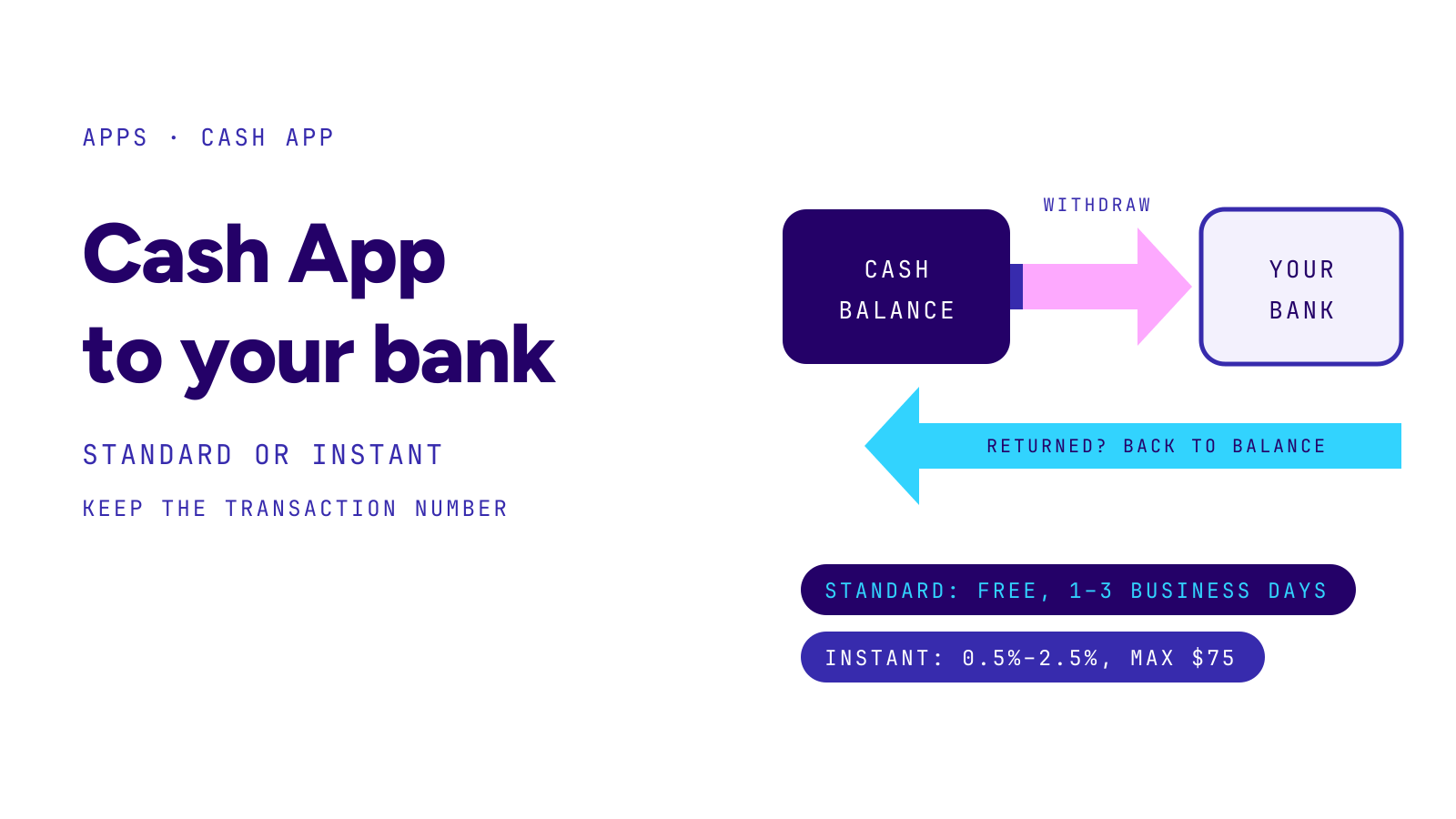
A Cash App transfer to bank is called a withdrawal. Standard is free and usually arrives in 1–3 business days; Instant goes to a linked debit card and typically lands at once for a 0.5%–2.5% fee. If the money is late, your bank, not Cash App, finds it, using the reference number on your withdrawal receipt.
On this page
Open the Money tab, tap Withdraw, enter the amount, then pick the bank account and the speed. The speed you pick decides the fee and the clock. What follows is how to choose, how to count the days, and what to do when the deposit does not show up.
At a glance
- Standard withdrawalFree, usually 1–3 business days
- Instant withdrawal0.5%–2.5% fee (minimum $0.25–$1, maximum $75), to a linked debit card
- Fee shownBefore you confirm the withdrawal
- Card cannot take InstantFee refunded, money arrives as standard in 1–3 business days
- After sendingCash App cannot cancel or reverse it
Source: Cash App: Withdrawal Transfer Speed Options · Cash App: Withdrawal Transfer Wasn’t Instant · Checked on November 12, 2026
How to move your Cash App balance to a bank
In the app:
- Go to the Money tab.
- Tap Withdraw.
- Enter the amount.
- Choose the bank account and the transfer speed.
- Confirm with your PIN or biometrics if asked.
On a computer, log in at cash.app/account, click Money, then Withdraw under your Cash balance, and pick the amount, account and speed the same way.
Cash App says the speeds on offer can vary with the bank or card you choose. If Instant is not offered, check which bank or card is selected.
Source: Cash App: Withdrawal Instructions · Checked on November 12, 2026
Standard or Instant: what the fee looks like
Cash App publishes a range, not a single rate: 0.5% to 2.5% of the amount, with a minimum of $0.25 to $1 and a cap of $75. The exact fee appears on screen before you confirm, so read that number rather than working from the range.
| You withdraw | Standard | Instant, lowest rate (0.5%) | Instant, highest rate (2.5%) |
|---|---|---|---|
| $40 | Free | $0.25 to $1 (the minimum applies) | $1 |
| $400 | Free | $2 | $10 |
| $2,000 | Free | $10 | $50 |
| $5,000 | Free | $25 | $75 (capped; 2.5% would be $125) |
Calculated from the range on Cash App’s help page. Your rate inside the range is the one Cash App shows you. Checked on November 12, 2026.
Cash App’s own guide to sending money, updated May 2026, quotes 0.5%–1.75% for Instant. The help page above gives the wider range and the $75 cap; the fee on your screen settles which applies to you. To compare with Venmo and PayPal, see instant transfer fees.
Counting the 1–3 business days
Business days skip Saturdays, Sundays and Federal Reserve holidays. The next one is Thanksgiving Day, Thursday, November 26, 2026; Christmas Day, Friday, December 25, follows.
Timeline
- Wednesday, November 25, eveningyou choose Standard for $300
- Thursday, November 26Thanksgiving, not a business day
- Friday, November 27business day 1; the money may arrive
- Monday, November 30business day 2
- Tuesday, December 1business day 3; if it is still missing after today, call your bank with the reference number
Source: Federal Reserve: Holidays Observed · Cash App: Withdrawal Transfer Speed Options · Checked on November 12, 2026
The same $300 sent with Instant on that Wednesday evening to a supported debit card would typically arrive at once, holiday or not. That is the case the fee pays for. More on holiday timing in Federal Reserve holidays 2026.
When Instant turns into standard
Some debit cards do not consistently support the networks Cash App uses to send money instantly. When that happens, Cash App refunds the Instant fee and the money arrives in your bank account in 1–3 business days, like a standard withdrawal. You do not need to do anything for the refund.
Which cards work at all: Cash App supports US-issued Visa, Mastercard, American Express and Discover debit and credit cards. Most US prepaid cards can be linked, but Cash App warns that withdrawing to them may not work. ATM cards and business debit cards are not supported.
Source: Cash App: Deposit wasn’t Instant · Cash App: Supported Cards · Checked on November 12, 2026
The money has not reached your bank
Cash App’s instruction here is to go to your bank, because the deposit is now in the bank’s systems. Take the right number with you:
- Open the Activity tab and select the withdrawal.
- Scroll to Transaction number.
- Read which reference the receipt shows and give it to your bank:
| Reference on the receipt | Where the money went |
|---|---|
| Visa Network ID | A Visa debit card |
| Mastercard Banknet Reference Number | A Mastercard debit card |
| Discover Network Reference ID | A Discover card |
| American Express Acquirer Reference Data | An American Express card |
| ACH Trace Number | A bank account, by ACH |
Source: Cash App: Withdrawal Transfer Speed Options · Checked on November 12, 2026
Your bank looks the deposit up by this number, so read it out exactly as the receipt shows it. For what an ACH trace number is and what else to ask, see ACH trace number.
If the bank says the deposit was returned to Cash App, ask the bank when the return will settle. Once it is processed, Cash App says the money reappears in your Cash balance on its own.
Warning
Cash App cannot cancel or reverse a withdrawal once it is sent. Check that the right account is selected before you confirm. Cash App support is reached through the chat in the app or (800) 969-1940, the number on its help pages.
The bank will not link
If the app will not connect your bank, Cash App’s help page describes a manual route: on the Money tab, start a withdrawal, choose Standard (1–3 business days), type “cashapp” in the bank search field, tap Add Manually, and enter your routing and account numbers. Standard withdrawals to a manually added account then follow the same 1–3 business day timing.
Source: Cash App: Problem Linking Bank Account · Checked on November 12, 2026
Read next: Cash App limit for sending and receiving caps, and Cash App payment pending if the problem is a payment to a person rather than a withdrawal.